Sunday, August 12, 2012

Automation of a Garage Door

I was inspired by this video that I saw on YouTube a while back to both automate my garage door opener and to also install a position sensor. I finally got off my butt today to get the project done. All of the purchases had been previously made, and I was pretty sure that I had the appropriate tools.

Equipment List:

  • Already installed garage door opener
  • Radio Shack Relay (125VAC/10A DPDT Plug-In Relay)
  • Radio Shack Quick Crimp-On Disconnects (found here)
  • GE 45604 Z-Wave Technology Outdoor Module for Lighting Control (at Amazon)
  • Two prong extension chord (to be sacrificed).

Process:

  1. Wire up the relay to the extension cord providing power to the relay.  Specifically, cutting off the extension cord and then using the end with the prongs.  I've never wired up a relay - so this was a first to me.  I used simple wire strippers and cut the wires such that they would fit into the quick disconnects.  I crimped them using my wire strippers.  
  2. Wire up the relay to a blank section of the extension cord (just using some of the wire).  Added crimps on the end to be connected to the relay and left the end to be wired to the door opener stripped but bare wire.
  3. Here's what it should look like when all done:
  4. Add the Z-wave Outdoor Module to my MiCasa Verde.  I did this by plugging it in near the Vera, turning it on and having it add it.  I referred to it as Garage Door Opener.
  5. Take everything to the garage and plug it all in.  This involves wiring the stripped end of the extension cord to the same wiring terminal as the existing switch and remote control. This is what it looked like for me when it was all done. Note that the Z-wave switch and the relay were just sitting on top of the garage door opener (hopefully things don't move around enough to warrant zip ties).
  6. Add a scene to MiCasa Verde called "Garage Door" to turn on the switch and then turn it off in 5 seconds (the shortest amount of time possible).
Note: The wiring of the relay should be pretty straightforward.  The one I had, there was a simple wiring diagram on the back of it showing the state of the relay when it was open (off).

[Update 2013-12-16]
To add a little bit of clarity to exactly what I am doing with the relay here are some additional pictures and some explanation:

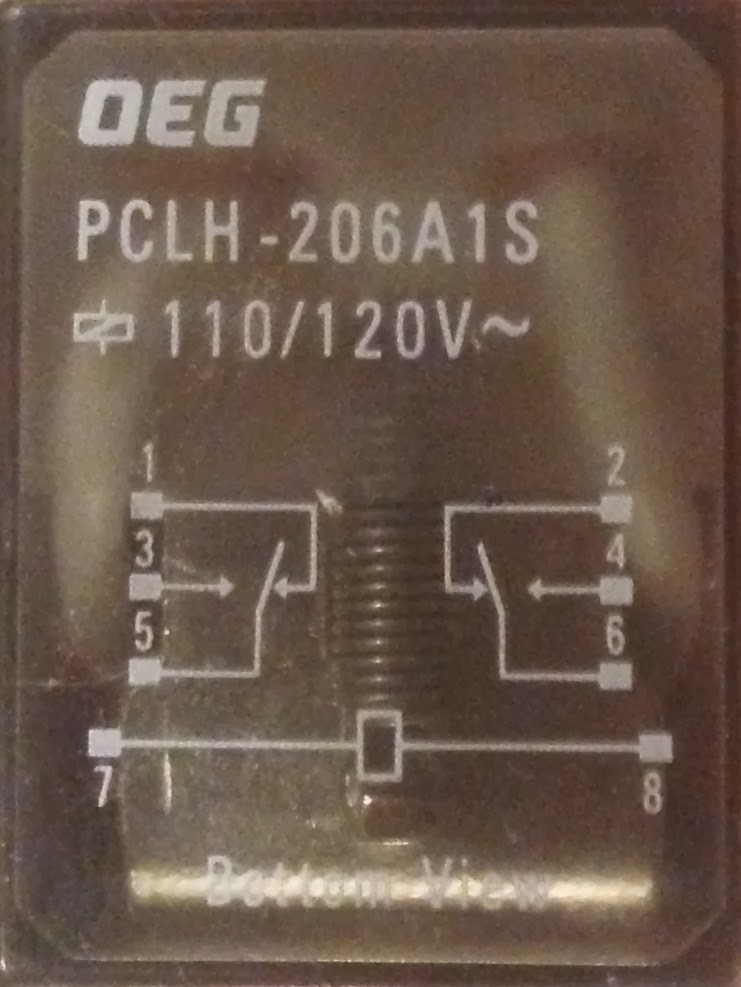
My relay was set up like this; the diagram depicts the configuration of the pins when the power is off.  When power is switched on, the link between 2 and 6 or 1 and 5 flips to 4 and 6 or 3 and 5.  This is essential to trigger the garage door, which needs a circuit to close for a brief moment (that is what your normal garage door switch is doing).

A little bit hard to tell here, but the power outlet from the Z-wave controller (the two white wires with the blue warning label around it) are plugged into the 7 and 8 poles.  The garage door opener is connected to poles 4 & 6 (normally open to one another, but when the relay is active, closed).

Another view from the business side of the relay; here you can see the numbers clearly on the left side of the relay (not used).

[End Update]

After it is installed, you may want to ensure that your previous means of raising and lowering the garage door still work (remotes, hard-wired All set.  Assuming the relay is wired correctly, when the scene is run you are good to go.

Bonus Round

I also and almost primarily wanted to know whether the garage door was up or down.  To do that, I needed an window or door sensor.  I chose an EverSpring Z-Wave Door / Window Sensor.  Prior to going to the garage, I added the sensor to the MiCasa Verde.

It turned out to be pretty easy to physically install, the key was finding a spot where I could keep the gap between the sensor to a minimum (less than 40mm) that was added to the door and the portion screwed in to the garage door frame. For me, this required adding a door shim behind the sensor to make sure it was close enough to the magnet in the traveling sensor. After final installation, it looks like the following:

After a few test runs making sure that there was no interference and that the MiCasa Verde was reading the position properly, I declared victory. Victory may be premature - my guess is that this setup may have issues in the cold - there is an air gap at the top of the garage door that might hamper the batteries in the sensor. We'll have to wait and see if that is the case, though. A 4.5V DC power supply could be brought to bear if need be.

Finally, I see the following in the room "Garage Door":

Monday, May 28, 2012

Spectrum wants to be Free!

In the winter of 2000, I came down to Fairfax to do an "externship" at AMS during what MIT calls its Independent Activities Period (or IAP for short).  While I was there, I ran into a guy who wrote a paper in his undergraduate time at MIT about sharing spectrum - ultimately arguing that nothing should be licensed and we'd be much better off with freeing spectrum.  Then, yesterday, I ran across this article in the NY Times that is essentially talking about doing something similar, but in a much orderly fashion, involving registration, but sharing a lot of government spectrum.  If this all pans out - it would free up an amazing amount of spectrum and free up a lot of data bandwidth.

Saturday, May 26, 2012

Simplest technology the best?

I went on a 20 mile bike ride today, but didn't bring any water with me.  Great ride, but I was pretty thirsty when it was over.  No worries, there was a McDonalds on my way home.  I went in, bought a large soda and got a cup for water.  That is when the problems started.

First, the water dispenser wasn't working.  Then, the Diet Coke that came out of was so thick with syrup that it was kinda gross.  And I had so been looking forward to the drink.  Why, I immediately wondered, couldn't I mix the amount of syrup that I wanted?

If you've been to Elevation Burger or BGR recently, you've seen some fancy touch screen soda dispensers.  They are fancy and have endless selection.  Diet Coke with some orage splashed in, no problem!  Anything.  But getting the mix of soda water to syrup down requires you to navigate several menu screens to get to just soda water.  It does the trick.

But not really as well as the old school machines that on the Sprite have a simple lever (akin to the water lever that typically sits next to the lemonade dispenser) that says Soda and as the name suggests, just dispenses soda.  What a simple and wonderful solution to the problem.  Infinite choice in a very simple package.

Sunday, March 11, 2012

Outdoor Lighting Quest

This probably should have been something that I did the first week we moved in here, but I have finally gotten to the point that every outdoor light works and is functioning. Here is the finished product:

The front (from a vantage point around the middle of the front yard)


The back
We have heard that lighting is one of the keys for good home security - more important than a fancy system. This was told to us by somebody who sells these systems for a living (and owns his own company). I finally decided I should make this happen.

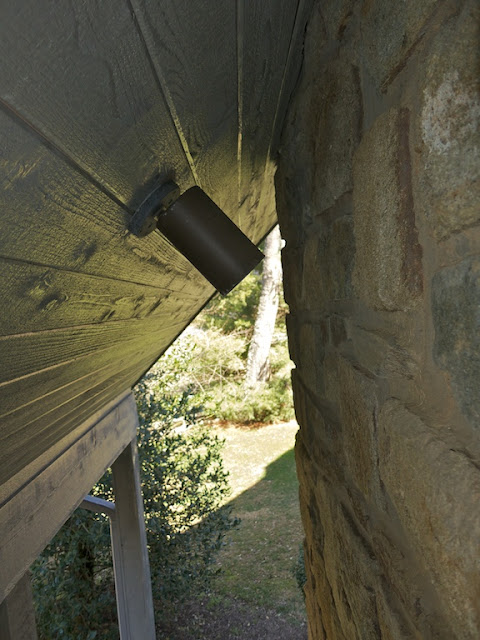
The road to get there was not trivial and involved learning that we had more lights than we thought. Specifically, we didn't realize until recently that the main outdoor light fixtures had elements pointing in the upward direction. Makes sense given how tall the light fixtures are, but we just didn't know. Also, we didn't know that there was a light facing downward on the chimney. All news to us.

Now for some LED fun. If we lit all of the lights in the front of the house with incandescent bulbs, we'd be burning close to a full kilowatt - or 910 watts. This assumes that each of the fixtures would have a 65 watt bulb, which is reasonable for the PAR 38s. So if we were to leave the lights on an average of 10 hours a night, it would cost us $365.37 per year to light up the front of the house at a rate of $0.11/kWh (roughly our current rate). With the LEDs (and one CFL, cause the LED wouldn't fit in that space), we are burning only 243.5 watts. As a result, we will be saving $267.60 per year on electricity costs. However, the bulbs do cost more.

A cheap set of 65 watt PAR 38 lightbulbs costs $2 each. So for our 14 lightbulbs, lets assume a baseline price of $28, which would probably have to be replace every other year. I recently bought the PAR 38 LEDs at Costco for $36.99 (12 in use) and a PAR 30 for $29.99 (one in use) and the CFL (one in use - about $7). The total cost for the LED arrangement is a lot. Without going into too much more detail in words, see below:


The one aspect that the above chart ignores is the cost of changing lightbulbs. Though my labor in actual terms is free, I'd like to believe that my time has some non-zero value. The LEDs should last somewhere in the range of 7 years, while its unlikely that the incandescent bulbs will last more than two. In fact, the LED's should never burn out totally - their end of life is defined by only outputting 50% of their original brightness due to a degradation of the phosphorus, which happens due to the heat). That said, I don't know how these bulbs will perform outdoors. There will very cold days, where its not likely that the bulbs will heat appreciably at all and other summer nights where they will be hot. All that said, not having to think about these bulbs for the next seven years is probably worth another couple hundred dollars (even if only $30 per year -- that's still $210). I know that this is one of the drivers of adoption of LEDs for businesses - and I think it definitely factors into my thinking, too.

Finally, here are some pictures about the process for getting everything set up:


This is the "new" light


Its actually a long ways up there; this is the view from the bottom


And from the side


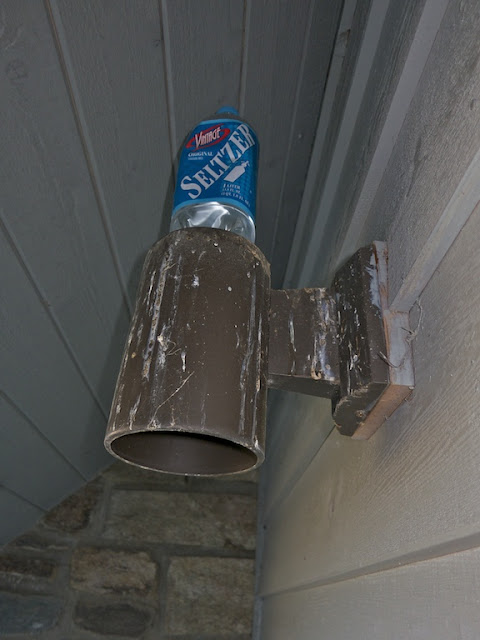
I was also replacing a bulb here - note the bottle of water placed on the top to help disuade any birds from building nests there, which is what happened last year. The birds crapped all over the porch and generally made a mess of things. Not terribly awesome - we were hoping to avoid it for the future - and are looking for a more permanent solution.

Ultimately, the front and rear house lights are going to be controlled by my Mi Casa Verde system that I purchased a while back, but have no hardware running on. As soon as I figure out just what types of switches I have (2-way versus 3-way, etc.) and which ones will work from a systems integration perspective.

Saturday, March 10, 2012

You Ain't Got a Thing if You Ain't Got that Ping

I have been testing a Verizon Pantech 4G LTE device for work. Basically, to ensure that it delivers 3G performance as good as our current devices and a solid 4G performance when that is available. Andrew suggested that I run a speedtest.net test on it and compare it to our Cox cable internet service. The results are not that impressive . . . for Cox. Here are the comparison points:


Cox


Verizon

You will note that the ping on the Verizon card is pretty bad and that could very negatively impact gaming performance. That said, its individual performance exceeds that of my cable internet service. Go Cox!

The one very important aspect that the above test doesn't address is the amount of bandwidth one gets for your service level. In fact, try to find it here:

Its not there for Cox. Wonderful. So what are the limits? You can chat with a live representative and get an answer:

So then, what are they for Verizon 4G LTE? If this story is correct, they are 4GB for $30/month, 10 GB for $50 and 20 GB for $80. Not awesome. Especially when a single download (Mac OSX Lion) can be 4 GB. Or an HD movie can be a couple of GB.

For now, it looks like sticking with a wireline makes the most sense, but only from a data cap perspective.

Sunday, February 26, 2012

Nesting

I decided to take the plunge and purchase some Nest thermostats when I read some of the early press about them. You couldn't actually buy one at the time, all you could do was put your name on a list to get them first when they became available. I did so and then waited.

My motivation was pretty simple: I wanted something that was easy to program and internet accessible. In fact, the joy of a "self learning" system wasn't one of my primary motivating factors. The interface for the Nest looked good and my understanding was that it should fulfill my other wants - so I went ahead despite the reasonably high $250/unit starter cost. If I really could schedule easily, I could easily save the purchase price in a couple of years. Despite the fact that we had two programmable units in the house, I found their interfaces to pretty much be impenetrable and, for the most part left them unprogrammed.

On February 14, I got a message saying that I could order my Nest. But, "Click below to order, but please note that you can only order once using this personal reservation page." So I decided to take the plunge and ordered two - one for the upstairs systems and one for the downstairs. They shipped within two days and were here quickly - it was just a matter of me finding a few hours to install them and configure.

The installation was not difficult and the materials provided were well thought out. They even include a screw driver with interchangeable heads to allow you to easily unscrew pretty much anything that you'd encounter. There were also nice little (blue) stickers that you could use to label each of the wires positions before undoing anything; this should ensure that you don't mess anything up.

Despite all of the good documentation, there was a cryptic note about not having to jumper the Rc and the Rh (both red) lines together. It wasn't clear if I needed to attach one of them or both, if they were separate wires. I eventually concluded that there is only one red control line coming from the furnace and just connected it to the easiest place on the nest panel.

One of the more painful parts of installing the Nest is finding a part of our wall that wasn't chewed up with past thermostat installations. It would appear that they have been replaced multiple times. Strategically choosing a good position took the most amount of time in both cases (and even worse when I had to pull off the Nest upstairs after the first time due to one of the wires not being connected well).

Here are all of the install pictures:


So downstairs, I was starting with a pretty old Honeywell control unit - this was the starting point for the downstairs thermostat - not sure of the vintage


The old on the floor - with the new


Wires all labeled


Connected to the Nest mounting panel - conveniently with a built-in level


Mounted!


Mounted - upstairs!

After all of the wires were connected, you simply pop the eyeball (in Christa's words) on. It will want to connect to your wireless network, so the first step is to put in your password. After that, it updates to the most recent software level (the one downstairs did this several times before it was done - the one upstairs, just once). After that you can begin the setup; the first step is to show you which wires it thinks are connected. It does this in an incredible simple visual way, making sure that there is no question about whether its done right.


The rest of the setup to do on the machine is a breeze. The fun part comes when you sign up for a nest.com account. When you do, it recognizes the thermostat on your local network and you are good to go. From there, I took two different approaches. For the upstairs thermostat, I decided to set a schedule and for the downstairs I let the system learn our behavior to set the temperature.

The web interface for scheduling is pretty good, though not great. It does include copy and paste functionality. I don't know if its just an early quirk, but I lost the schedule the first time I put it together. The upstairs Nest had lost its connection to our wi-fi network, so that could have been a contributing factor. The primary iPhone application doesn't do much more than allow you to adjust the temperature, but that is exactly why I bought it.


What Its Missing:

  • My chief complaint so far is that Nest doesn't share any data with me. I should be able to access a log of all of the events of the thermostat (turn on, turn off, all of the relevant parameters at that point in time, such as why it was turning off or on).
  • The units are designed to learn about your behavior to help you save energy. But when that happens, it doesn't tell you anything about what its learned or what you have saved.
  • My wife doesn't like the aesthetic. It looks like an ugly eyeball in her opinion.

Sunday, January 8, 2012

One Step Backward for Compatibility

When we were visiting with relatives over the holidays, my wife's sister broke out a photo album. The album had a bunch of pictures from when the kids were young and she lived near us. I offered to scan the pictures in and give her back a CD with the scanned pictures on it. I figured it would be an easy exercise, given that I have a fairly capable HP ScanJet 5500c.

My first challenge was finding the power supply for the scanner. I tore up my office, but I eventually found the power supply. Only 45 minutes more into it than I thought I would have to spend.

I recently updated my Mac Pro to OS X Lion. While this is overall a great thing, it turns out that HP no longer supports my scanner for Lion. I bought the scanner in 2003 (judging by when reviews were published PC Magazine's website). Does it make sense that the scanner would be completely abandoned after just eight years? The old HP software was apparently written for OS X 10.4, but hasn't been updated since. HP's website suggests in one location that you should be able use it through Apple's built-in image capture program. No dice. Further research revealed that my scanner was just not supported. In the end, I will have to say that I'm not impressed at all with HP.

In any event, the only way forward was backward. What do I mean? I'm a bit of a pack rat, and I never got rid of my G4 tower. I booted it up, downloaded the most recent (10.4-compatible) HP software and started scanning. Three pictures at a time, but it did work flawlessly.

Friday, January 6, 2012

FAT!

I decided that I would add a new set of pictures to cycle through my digital photo frame. I've taken quite a few over the last year, all processed and edited through Aperture. I flagged the very best and then exported to JPEGs that fit into a 1024 x 768 pixel space (the native resolution of the photo frame).

For some reason, though, I couldn't add any more files when I tried to add them on my mac. I got a somewhat cryptic error, telling me that there wasn't any space left on the 2 GB card. There were only about 307 files totaling 55 MB on the 2 GB card. It wasn't adding up - I figured it was a PC formatted card and my Mac wasn't playing nice with it. I had a flash of brilliance - I just needed to copy the files from Andrew's desktop computer onto the 2 GB card.

I went to Andrew's computer (running Windows 7) and tried to copy files over. I got a slightly different error message on Windows and chased it down. I found the right advice here. Turns out that my 2 GB card was formatted at FAT16. Seriously? How does a device made in 2010 get formatted with a technology hailing from 1984?

Seriously, it was formatted as FAT16, like the file format that shipped with MS-DOS. That format limits the number of files in a directory to 512. The root directory is even more limiting. After a quick reformat to the fantastically current technology of 1995 that is FAT32, the pictures copied over fine.

Monday, January 2, 2012

Does HDR matter?

My new S100 comes with an HDR mode (along with a bracketing mode). Here's the differences:
  • HDR Mode: JPEG only. Camera shoots three times and then processes the images into a single JPEG. No options for adjusting the mechanics of the HDR processing, but super simple and complete solution.
  • Bracketing Mode: After choosing this shooting type from within one of the manual modes (M, Av or Tv), the camera will take three pictures bracketing the exposure with +/- 0.5 to 2.0 AEB levels. This would then allow the user to post process using specialized HDR software like Photomatix.

I took a few pictures this morning of a pretty high contrast scenes. Here is the first pair of results:


The first in all auto mode


The second with HDR scene mode

I think that the obvious place where HDR mode excels is the tree branches. They are severely washed out in the auto mode picture. While this can be partially corrected after the face by tuning the highlights down, you will end up with an unnatural green tint around those branches. HDR mode wins!

Here is another comparison, which involves more work using the bracketing function and HDR software:

Another Reason to Love Amazon

I'm a big fan of the notion that we should be in control of our own data and vendors that make our data more readily accessible to their customers will have a competitive advantage. Although this is probably conventional wisdom in the B2B or commercial space, I don't think that its well enough recognized in the consumer space.

On Amazon's site, you can choose: Your Account > Your Orders > Order History Reports and download a pretty complete summary of activity on your account in csv format. We are very satisfied Prime members and feel like we use Amazon a lot. We ordered 108 items on Amazon last year, making our per unit cost of prime less than $1. Some were food related (on subscriptions) but many were books and electronics. A great deal for us.

Some quick thoughts on extensions:
  • Grocery Store: How cool would it be for you to be able to download an entire year's worth of food purchases. You know that they are collecting this information about you for their convenience. Why not make it available to you for your convenience? Layer some analytics on top of it. Sure, it will be an incomplete list of things you purchased, but it would also give you incentive to only shop at one chain, to ensure all of your purchases are saved in one place, making the analytics all that much more powerful.
  • Drug Stores: Big missed opportunity here. CVS and Walgreens should be providing a means for people to print out receipts for all HSA/FSA eligible items that they've purchased over the previous year. This would be perfect for people like me who are not very careful to save their receipts, but then want to file all at once. Generate a PDF and you are good to go and submit.
  • Home Improvement Stores: Another big opportunity missed: when selling a house, you can write off the gains, all of the money that you've put into the house. Why not let people track what they've spent on improvement projects (over long periods of time) with purchase order trackers for the individuals. This would allow them to separate out capital improvements from the purchase of lawn fertilizer, which is obviously not allowed.
  • Discount Stores: Why doesn't Wal-mart or Target allow us to see how much we've saved by shopping there (relative to our store of choice)? This seems like an obvious way for them to reinforce how "everyday low prices" they really are.

I really can't think of good reasons for these types of retailers to not do this. Are they afraid that customers will suddenly notice that they've spent a lot of money on a particular category of items? Or is there just a profound lack of creativity on the part of companies with respect to the usefulness of customer data to customers?

Thoughts on an S100

I bought a Canon S100 for myself for Christmas. I've been working my way through the user's manual (over 250 pages) for a few nights while watching TV. Its been reasonably slow going as a result. I will be posting individual posts about features (and example pictures), but I also wanted to post some overall thoughts here:
  • Lots of features: this camera can do a lot. The user guide is a bit long-winded with lots of pretty pictures and icons to illustrate, but this camera can do a lot.
  • Why does pre-programmed have to equal JPEG? Argh!!!! Why does Canon limit me from saving to RAW when I use the scene or auto mode? I find this to be a deal-killer for using these modes. Many of the modes can be better done in post-processing (like color enhancement or blurring for a miniature effect), but some, like shooting in snow, would be great to shoot RAW instead of JPEG. It would make me much more comfortable, too. I would trust the special scene modes that much more, knowing that I had more flexibility to fix any potential problems after the fact.
  • Reviewers are not joking about the short battery life: It doesn't last too long. Get a backup. Amazon has one (a Canon NB-5L) for only $35.
  • I like GPS tagging as much as I thought I would: Its super sweet when it works. Just don't expect indoor shots to have a tag. The satellite icon lets you know where you stand. It does take a few minutes to find a signal, but once it indicates that the signal has been obtained, it will tag your photos.

Wednesday, November 30, 2011

LEDs in the WSJ

Though I may not pay for maintenance costs at my house in terms of dollars, the same calculus described in this article in the WSJ holds for me too. I don't want to replace bulbs 20 feet up in recessed lights in my ceiling.

Sunday, November 28, 2010

The Move to Aperture

I recently upgraded from iPhoto to Aperture. Overall, I'm glad I did, though this assessment may be a bit premature. I'm a reasonably experienced iPhoto users, so hopefully my experience could be instructive for others out there.

Here are my initial thoughts on Aperture:
  • Import Process: Setting up the process to import is easy and I particularly liked how the process did not take up all available resources. That is to say, after Aperture identified all of the events from iPhoto to import, it went about the import in an event by event fashion. As soon as an event was imported, you could go to work on it.
  • Faces Import Data Integrity:Faces information came in well. All of the people that I had tagged were there with all of their associated pictures. Note that this included 100's of photos for some of the kids, so it would have been a real hassle if it had not worked well.
  • Places Import Data Integrity:Apparent failure at first. None of the geotagging information seemed to be imported. None whatsoever. That is say that when I went to the map, there were no pins on it. At first, there are only two things that mitigate this failure: ex post geotagging is easily done with multiple photos and you can import a GPS track log and pictures to geotag. This will remove the extra step of using GPSPhotoLinker for doing this with iPhoto. After messing around some more, and unsure if I was just looking at things incorrectly previously, it appears that my tagging information is still there. Excellent. I'm looking forward to tagging a larger percentage of newly imported pictures and will also work to tag some old stuff due to the easier process.
  • Image Adjustments: Brushes One of the items that I thought was particularly interesting about Aperature was the ability to brush in our out an image adjustment. This has already come in very handy for some post-processing of an image that needed the lowlights brought up, but had some blacks in it that I wanted preserved. Not a problem, just brush out the adjustment on those areas.
  • Keyboard Shortcuts: There are a lot of them, which is very appealing to me. I've already downloaded a cheat sheet and have put next to my monitor. I hope to learn them over time.
  • Interface: I will have to say that I have done much more stray clicking around in Aperture than I have ever done in iPhoto. The interface looks like its going to take some getting used to. That said, I'm not worried that it will never make sense. I think it will just take some getting use to.
  • More to come . . . .

All I want for Christmas

There are few things in the electronics realm that I find overly compelling from a Christmas present receiving sort of perspective. That is to say, there isn't much I want for Christmas. Part of the problem as I have gotten older is that my interests shift to larger and larger dollar purchases. In no particular order, here are the few things that I do sort of want:

  • 30" Dell Monitor: I've been wanting to replace my two 20" Dell monitors on my desktop for some time. My hope was always that the 30" monitors would be well below $1000 by now. Alas, they are not and I can't get myself to take the plunge yet. I'll have to look for refurbished and sales items from Dell.
  • A Sports Watch: Thinking something cheap or on the order of $35 and from Nike or some other such sport brand. Doesn't need to do anything but tell the time, just like they did 100 years ago, but digital, waterproof, sleek and durable would be nice.
  • Home Automation Gear: This is still on my list of things to do, but hardly seems like a Christmas present. Maybe there are some starter packages that work well. I've been advised by a friend who runs a home automation company that Control4 is a much better purchase than Insteon or X10. Therefore, I'm a little hesitant to buy any other as a result. I also think that I would find it useful to have the security system (that we haven't decided on buying yet) tied into the home automation system.
  • A New, Higher Quality Pocket Cam: I have a range of cameras available to me right now: a Canon 5D Mark II (high quality, but crazy bulky), a Canon Digital Rebel XT (still high quality in most cases, but still bulky), an Olympus Stylus 1030 SW (pocketable, waterproof, and virtually indestructible but optics and picture quality are mediocre). I have researched a bit and found two good candidates, but neither is sufficiently compelling to take the plunge. The first, the Canon S95, inspired this post from David Pogue from the NY Times. The S95 has a large sensor and great features to take great pictures. It does, however, still lack GPS tagging, one of the key features that I find compelling about the Panasonic Lumix DMZ-DS7. It not only has some good optical properties, including a 12x zoom, but it also has the GPS tagging.
  • Vehicle Port Logging: I ran across the concept in Popular Science (or Mechanics, not sure which) and am very much intrigued. There are at least two options: the Rev and the (less excitingly named) GL1. Both of these products combine information from your phone's GPS data stream with data from your vehicle's OBD-II data port output. That second stream of information will allow you to track instantaneous fuel consumption, engine revving, service codes, etc. I think that there would be a bit I could learn about how I drive and when I do or do not waste gas. Of course, in the end, I would want to be able to keep the data in my own database, just not sure that part is going to happen. UPDATE: After reading this review, I've decided that the GoPoint GL1 has a ways to go before I want to invest my time and effort into it. The software may have improved since the April review, but the fuel efficiency calculations were horrendous -- enough so as to mislead. I will wait for some maturity here.

Thursday, December 31, 2009

FIOS: Not yet

I have recently been motivated to pay less for my TV & internet service. This was really driven by the fact that my monthly bill for TV & internet from Cox is $132 and change (roughly $10 of that in taxes).

I would think that FIOS would be a good alternative. They are the upstart, working hard to gain market share and so on, right? Apparently not. I'm not sure why, but they are not willing to provide me a bundle that is a lower price than Cox. In face, when I price it out, the price is exactly the same. Here's the scoop:

FIOS:
The key problem here is that you need to pay monthly for a set top receiver for every TV that you use. This is problematic when you have up to six TVs that you'd want to be able to get service. The following assumes that we only hook up three TVs: HD on the big TV and the master bedroom and SD TV on one other. This adds $26/month to the cost of the service. Outrageous - especially since Cox doesn't require a box for any connection. And, we can get HD on our TVs without any box (so, its not just SD TVs that this works for).

Sadly, this setup doesn't even include a DVR (which we currently have with Cox). Note that I haven't done a channel-by-channel review to see what service has what. Both include the core channels that I care about: the networks, ESPN, USA and SyFy. I don't really think that there are too many others.

FIOS requires a year-long commitment and will guarantee your price for two years. So the bottom line price (before taxes) is $120 per month.

Here's a picture of how Verizon separates out the various charges:


Cox:
Cox's bill is broken out like the following:


It is worth noting that the Cox bill is before the $12/month discount that Cox extended to me for agreeing to a year-long term (the same terms that Verizon is seeking).

Conclusion:
Its always easier to do nothing (i.e., not change service) and I think that's what I'll be doing. A potentially, slightly faster internet connection is not sufficiently interesting to mess with the switchover.

The $150 incentive that Verizon is throwing out there to switch is not sufficient to cover my switching costs, which I consider to be the following:

  • Overlapping service: I won't switch off my current internet service until I'm convinced that my new service is working reliably and the way that I want.

  • Tearing up of my "lawn". OK, so it may not be the greenest and densest lawn in all of Northern Virginia, but I still don't want to have to deal with the installation.

  • Uncertainty: I may have missed something in my analysis. The FIOS service could be lacking in a way that I'm not comfortable with.

  • Flexibility with TVs: with FIOS I have to pay extra for every single additional TV that I might want to have hooked up. Not something I'm OK with doing, even though I don't have plans to do so and despite the fact that my kids watch more TV programming on their computers than on TVs

Tuesday, March 17, 2009

iPhone 3.0: Finally right?

It used to be said that you should never buy a Microsoft product until it was in version 3.0. I think this held true for Windows, but I'm not sure it did for many of their other products (Bob, anyone?). Apple finally announced the feature set in their version 3.0 software today. Instead of going through features, I thought I'd opine on what sort of applications with accessories could now be useful. This article inspired me to write. Here are my thoughts:

Workout Monitoring: The combination of a bluetooth heartrate monitor (one is coming, see here), bluetooth accelerometers (preferably 6 axis of this size, for both wrists and ankles. All sensors should transmit to the iPhone and should be rechargeable. These sensors, along with some intuitive workout logging software would be killer. See my earlier ramblings on the topic.

Receipt Scanner: How cool would it be if you could clip a stubby little scanner and scan in store receipts directly to your iPhone? You would never lose a receipt and could manage/print out in on a web-based companion application.

Laser Measurement: Clip a simple laser measurement tool into the bottom of the iPhone and quickly take room measurements while you sketch a map of the room on the screen. Combine with the iPhone's accelerometers and have the software draw the full map for you.

Pool/Hottub Chemistry Testing: Yes, water is not a good friend of the iPhone. But, using the accessory port, make a tool that you dip into your pool or hot tub and it would tell you all of the relevant metrics: chlorine levels, pH, temperature, etc. The application should keep track of your measurements over time (and allow you to track pool and hot tub separately).

"My Life in Words": Track every conversation you have. Record (on a VOX basis), all day long. Recognize those with whom you are having the conversations with and combine with voice recognition software to capture in easily text-readable form. Sync everyday with your computer to limit the data requirements.

Whole-house Intercom: Put each iPhone in the house capable of contacting any computer/VoIP enable intercom and let loose (as in, talk to anybody in the defined network).

Bluetooth/WiFi Kitchen Scale: Totally unnecessary, but it would be pretty cool if you had a kitchen scale that connected to your iPhone that could walk through recipe and could let you know when you've put enough of each ingredient in the bowl.

Wednesday, March 4, 2009

Some Further Thoughts on TED

So, I've learned a bit more about TED and I owe their designers an apology. They do provide easy access to both MTU's data. I just had to go down the drop down box a bit further to find the separate export options. It just turns out that for me, the one MTU has an average measurement of 4 kWh/hr and the other one is 0.4 kWh/hr, making the split between the two not that interesting from me.

If we pull out the other activities going on, we can isolate the heat pump as a 9 kWh/hr load (wow!). This is the single largest and most notable load in my house and one that needs to be addressed next year.

Also, I learned a bit more about TED in that the Footprints software actually exposes its current information using http. If you go to http://localhost:9090/DashboardData on a browser on the computer that is running, you'll get the below XML. If you have a static IP address on this computer (reasonably easy to set up on a modern router/wireless access point using the computer's MAC address), you can then call the information from any computer on your network.

Unfortunately, despite all of the wondrous information (including separate real-time readings from the two different MTUs), they left out the current time. Huh? They included lots of random daily accumulations of data, but not the current timestamp. Odd choice, not quite sure why they would see fit to include the month and year, but not the full timestamp.

This seems well suited to a WAMP setup to capture the data in a much more flexible fashion (though one that's much more likely to fail at some point).

See the full XML below:

<dashboarddata>
<vrmsnowdsp>121.4</vrmsnowdsp>
<daysleftinbillingcycle>28</daysleftinbillingcycle>
<presentspendingperhour>0.00</presentspendingperhour>
<currentrate>0.0000</currentrate>
<lovrmstdy>117.3</lovrmstdy>
<stlovtimtdy>09:20</stlovtimtdy>
<hivrmstdy>124.3</hivrmstdy>
<sthivtimtdy>13:36</sthivtimtdy>
<lovrmsmtd>117.3</lovrmsmtd>
<hivrmsmtd>125.4</hivrmsmtd>
<kwpeaktdy>16.650</kwpeaktdy>
<dlrpeaktdy>0.00</dlrpeaktdy>
<kwpeakmtd>18.390</kwpeakmtd>
<dlrpeakmtd>0.00</dlrpeakmtd>
<watttdysum>3967344</watttdysum>
<kwhmtdcnt>4074.000</kwhmtdcnt>
<lovdaymtd>99</lovdaymtd>
<hivdaymtd>65</hivdaymtd>
<dlrnow>0.00</dlrnow>
<dlrtdy>0.00</dlrtdy>
<dlrmtd>0.00</dlrmtd>
<dlrproj>0.00</dlrproj>
<dlravg>0.00</dlravg>
<kwnow>2.350</kwnow>
<kwtdy>66.1</kwtdy>
<kwproj>3266</kwproj>
<kwmtd>298</kwmtd>
<kwavg>149.1</kwavg>
<co2now>3.65</co2now>
<co2tdy>102.49</co2tdy>
<co2mtd>462.11</co2mtd>
<co2proj>5062.30</co2proj>
<co2avg>231.06</co2avg>
<ledstatus>GREEN</ledstatus>
<buzzerstatus>OFF</buzzerstatus>
<pastmonthlydata>
<monthhistoricaldata>
<month>3</month>
<year>2009</year>
<dlr>0</dlr>
<kwh>26</kwh>
</monthhistoricaldata>
</pastmonthlydata>
<isdualmtu>True</isdualmtu>
<mtu1wattsnow>1.690</mtu1wattsnow>
<mtu2wattsnow>0.650</mtu2wattsnow>
<mtu1co2now>2.62</mtu1co2now>
<mtu2co2now>1.00</mtu2co2now>
<mtu1dlrnow>0.00</mtu1dlrnow>
<mtu2dlrnow>0.00</mtu2dlrnow>
<mtu1vrmsnow>121.4</mtu1vrmsnow>
<mtu2vrmsnow>121.4</mtu2vrmsnow>
<demandusage>8.524</demandusage>
<demandcharge>0.00</demandcharge>
<energycharge>0.00</energycharge>
</dashboarddata>

Tuesday, March 3, 2009

TED: Voltage Sag

Not sure if its meaningful, but there is a pretty strong voltage sag when my house draws a lot of power from the Dominion system:


The R^2 of the relationship is 58% and the T-stat for the KW variable is 218 - I'd consider this significant. This graph was generated in 'R' using the following commands:

plot(ted$KW, ted$VRMS, xlim=c(0,20), ylim=c(117,123), pch=3)
lines(ted$KW, lm(ted$VRMS ~ ted$KW)$fitted.values, col="red")


In any event, the voltage ranges appear to be well-within the current standards (if Wikipedia is correct):
In the United States and Canada, national standards specify that the nominal voltage at the source should be 120 V and allow a range of 114 to 126 V (-5% to +5%). Historically 110, 115 and 117 volts have been used at different times and places in North America. Main power is sometimes spoken of as "one-ten"; however, 120 is the nominal voltage.

Some Thoughts on TED

Thoughts about the Gadget:

Too Much Juice: TED delivers what it promises, but in surprisingly non-green way. I say this because the RDU (the "Receiving Data Unit" - the little white box with the LCD display) does not cache any of the data that it collects. Therefore, if you want to be able to analyze anything, you have to keep your computer on and logging data. For as cheap as flash storage is these days and as compact as these files are - why not throw a couple of GB in there and let the user download to their computer 1x per week (or live if they choose). TED brags that it only consumes 6 watts. Sure it does, but when you add in my computer, then you get a number roughly 10x that. So, if the TED designers didn't want to pay for the flash memory, fine, include a USB port that was thumb-drive compatible. Keep logging onto that device until it runs out of space.

Weak Software: The Footprints software is pretty much useless at this point. It installed just fine and connected to the RDU (the most important aspect) and began logging the information. Unfortunately, now I just get a blank white screen with the same symbol my browser gives me when it can't find an image. Impressive. And, if I turn it off to troubleshoot, it will lose data. Great.

Stupidly Aggregating Data: The TED 1002 model that I have gets two separate signals from the two separate circuit breaker panels that the MTUs are located in. Why does the log only include one total consumption number? The whole point of this device is to measure usage so that it can be curbed or eliminated. TED loses valuable segmentation on where the load is coming from when it is available for free. An astoundingly bad design choice.

Thoughts about the Data:
My average electricity usage over the displayed time is 5.01 kWh/hr - pretty high. That would mean (if I assume a similar average profile over the course of a month) that I could expect and electric bill of $328.01. This is built up on an $0.088/kWh (I believe the current Dominion average rate) * 744 hours in a 31 day month * 5.01 kWh/hr.

Last month (actually January 12 - February 9), I used a total of 7616 kWh, which I find astounding. That equates to roughly a 10.5 kWh/hr average usage rate. Based on what I've seen so far, that basically means that the heat pump (using resistive heat) upstairs ran continuously for the entire month. The heat pump must go!

Further Extensions:
It looks like there has been some hacking about the TED database. This could allow me to set up a process by which the tick data is uploaded real-time to a local MySQL server and the data available for jpgraph display and analysis in 'R'. Sounds like a good project for the kids. . .

First TED Reading

Here is a quick view of my first overnight energy readings from TED:


This was generated in 'R' using the following commands:

# Read in data
ted <- read.csv('User/markb/Desktop/Recent_TED.csv')

# Format so TIMESTAMP can be used with POSIXct
ted$time <- as.character( strptime(ted$TIMESTAMP, "%m/%d/%Y %I:%M:%S %p", tz="") )

# Plot the data
plot(as.POSIXct(ted$time),ted$KW, type="l", bty="L", col="red", ylab="Usage (kW)", xlab="Time (each point is second)", ylim=c(0,20), main="Electricity Usage Patterns")
abline(h=0)

# show baseline usage
abline(h=mean(ted$KW[ted$KW < 2]), col="gray")

# add voltage information
par(new=TRUE)
plot(as.POSIXct(ted$time), ted$VRMS, axes=FALSE, bty='L', ylab='', xlab='', type="l", col="gray", ylim=c(100,125))
axis(4)
mtext("Voltage (VRMS, in gray)",4)
abline(h=120, col="gray")

# go to bed
abline(v=as.POSIXct("2009-03-02 22:00:00"), lty=2)
# wake up
abline(v=as.POSIXct("2009-03-03 06:00:00"), lty=2)